Note
Go to the end to download the full example code.
Knot operations and Bézier extraction
The same curve can be written many ways. Knot insertion and degree elevation change a B-spline’s representation – they add control points – without changing the curve it describes. This tutorial demonstrates that invariance, then extracts the per-element Bézier pieces: the element-local representation that finite-element / isogeometric assembly consumes.
These operations are the workhorses of refinement and analysis; the
Spaces, knots & element extraction guide explains the underlying theory (continuity, knot
multiplicity, and the SpanwiseElementExtraction operator behind
to_beziers).
import matplotlib.pyplot as plt
import numpy as np

from pantr import viz
from pantr.bspline import Bspline, BsplineSpace, BsplineSpace1D

space1d = BsplineSpace1D([0, 0, 0, 1, 2, 3, 3, 3], 2)
control_points = np.array([[0.0, 0.0], [1.0, 2.0], [2.0, -1.0], [3.0, 1.5], [4.0, 0.0]])
curve = Bspline(BsplineSpace([space1d]), control_points)
Knot insertion is geometry-preserving
Inserting knots adds control points and shrinks the control polygon toward the curve, but the curve itself is unchanged (to round-off).
refined = curve.insert_knots([0.5, 1.5, 2.5])
u = np.linspace(0.0, 3.0, 200)
err = np.max(np.abs(np.asarray(curve.evaluate(u)) - np.asarray(refined.evaluate(u))))
print(f"max |curve - refined| after knot insertion = {err:.2e}")

orig_cp = curve.control_points
new_cp = refined.control_points
fig, ax = plt.subplots(figsize=(7, 4), constrained_layout=True)
pts = curve.evaluate(u)
ax.plot(pts[:, 0], pts[:, 1], color="navy", lw=2, label="curve (unchanged)")
ax.plot(orig_cp[:, 0], orig_cp[:, 1], "o--", color="0.7", label="original control net")
ax.plot(new_cp[:, 0], new_cp[:, 1], "s-", color="crimson", alpha=0.6, label="refined control net")
ax.legend()
ax.set_aspect("equal")
ax.set_title("Knot insertion refines the net, not the curve")
plt.show()
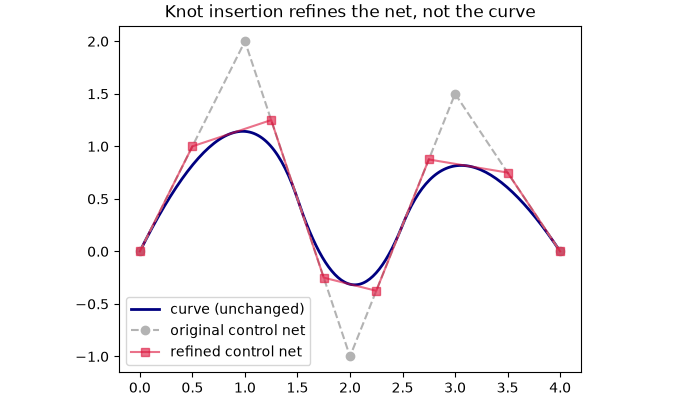
max |curve - refined| after knot insertion = 4.44e-16
Degree elevation is geometry-preserving too
elevated = curve.elevate_degree(1)  # quadratic -> cubic
err = np.max(np.abs(np.asarray(curve.evaluate(u)) - np.asarray(elevated.evaluate(u))))
print(f"degree {curve.degree[0]} -> {elevated.degree[0]}, max |curve - elevated| = {err:.2e}")
degree 2 -> 3, max |curve - elevated| = 8.88e-16
Bézier extraction
to_beziers decomposes the spline into one Bézier curve per knot span. We
render the elements in alternating colours – this is the element-local view
used for isogeometric assembly.
beziers = curve.to_beziers()
scene = viz.Scene()
for i, bez in enumerate(beziers.ravel()):
    scene.add(bez, color=("crimson" if i % 2 else "navy"), show_control_polygon=True)
scene.show()
print(f"{beziers.size} Bézier elements")
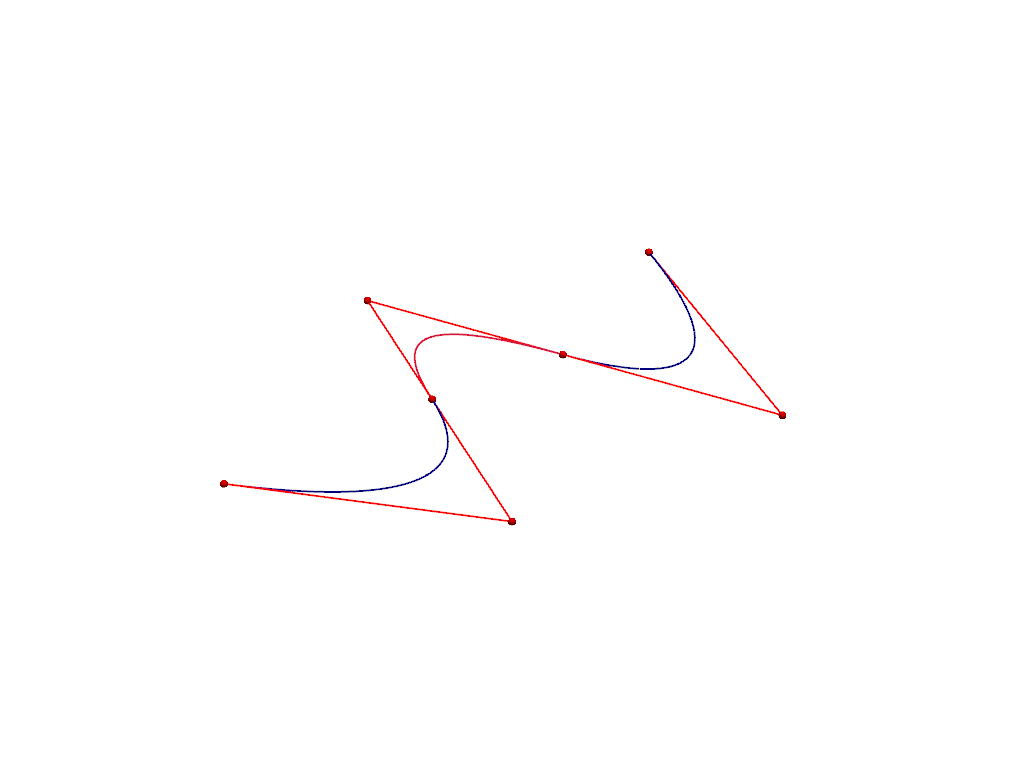
3 Bézier elements
Total running time of the script: (0 minutes 0.340 seconds)